READ BEFORE YOU SCROLL
Read a chapter.
Unlock your apps.

BookLock blocks the apps you choose, sends you back to your bookmark, and unlocks your screen time when the chapter is done.

Section Complete

You're on the list. We'll write when the book opens.

For iPhone · Built with Apple Screen Time

Real BookLock Simulator capture
Real app blocking Reading stays on-device No account required

The app block that sends you back to your book

You already reach for your phone every day. BookLock turns that reflex into a chapter finished before the feed opens.

A chapter at a time adds up. Put reading in front of the apps you already open and the shelf starts filling itself.

Your next read

Your book is always closer than the feed.

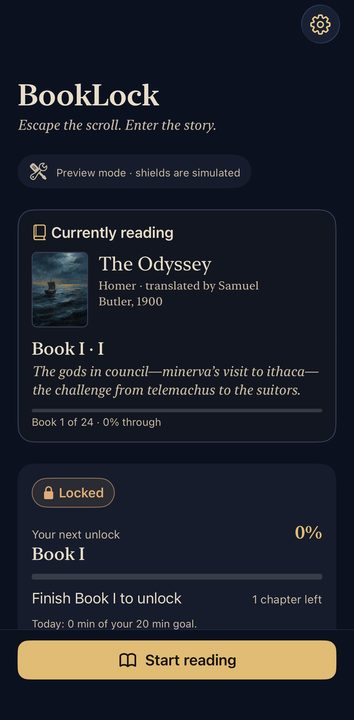
BookLock keeps the next chapter, your progress, and your next unlock in one place—so there is never a decision to make when distraction hits.

  • Return to the exact chapter you left
  • See precisely what earns your next unlock
BookLock home screen showing The Odyssey, reading progress, and the next app unlock
The first shelf

Begin with a book worth finishing

The Odyssey Classics History Philosophy More coming

BookLock launches with The Odyssey. More public-domain classics will follow.

The reader

The page takes over the screen.

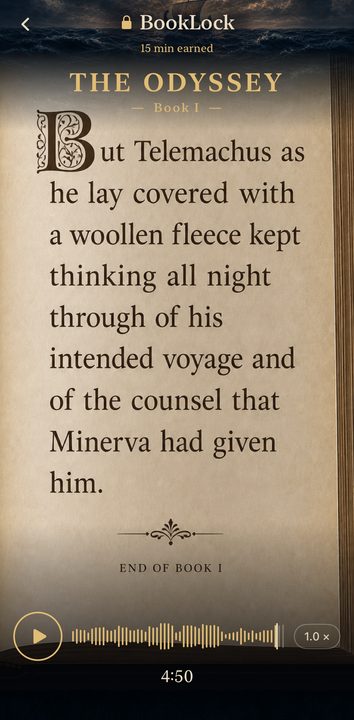
The book opens cinematically at your saved place. Read at your pace or follow the narration as each line glows across the page.

  • Full-screen, distraction-free reading
  • Optional voice narration with live highlighting
BookLock cinematic reader showing The Odyssey on parchment with narration controls
How BookLock works

From temptation to a finished chapter.

01 · CHOOSE

Pick your distracting apps.

Select the apps that pull you in. BookLock shields them using Apple Screen Time until your reading is complete.

02 · RETURN

Tap back into your book.

The shield closes the distracting app and sends a notification. Tap it to return to your exact saved page.

03 · UNLOCK

Finish the chapter.

Read through the chapter and BookLock returns the screen time you chose. The feed becomes a reward—not a reflex.

The payoff

Finish the chapter. Get your apps back.

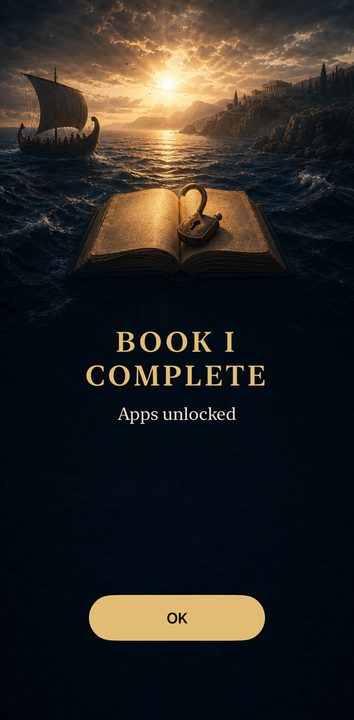
The moment you complete your reading, BookLock confirms the win and returns the screen time you chose. No vague goals—just a clear exchange.

  • Unlocks happen immediately on completion
  • Your book and progress are waiting next time
BookLock completion screen announcing that Book I is complete and apps are unlocked
Questions, answered

How BookLock actually works

Does BookLock really block other apps?

Yes. On iPhone, BookLock uses Apple’s Screen Time APIs to shield the apps you select after you approve access.

What happens when I try to open a blocked app?

The shield asks you to read. Its button closes the distracting app and BookLock sends a notification; tapping that notification returns you to your saved page.

Do I read for a certain number of minutes?

No. BookLock works by chapter. Finish the chapter assigned to your rule and you earn the amount of screen time you selected.

Can I choose the apps and unlock length?

Yes. You choose which apps are shielded, how many chapters are required, and how much screen time the completed reading earns.

Does BookLock track what I do?

No account is required, and reading progress stays on your iPhone. Apple gives BookLock private tokens for the apps you select rather than their names.
Coming to iPhone

Put a book between you and the scroll.

Join the waitlist for launch access and the next BookLock update.

No spam. One email when BookLock launches.

Section Complete

You're on the list. We'll write when the book opens.